10 Claude Code Features That Actually Changed My Workflow
Jun 30, 2026
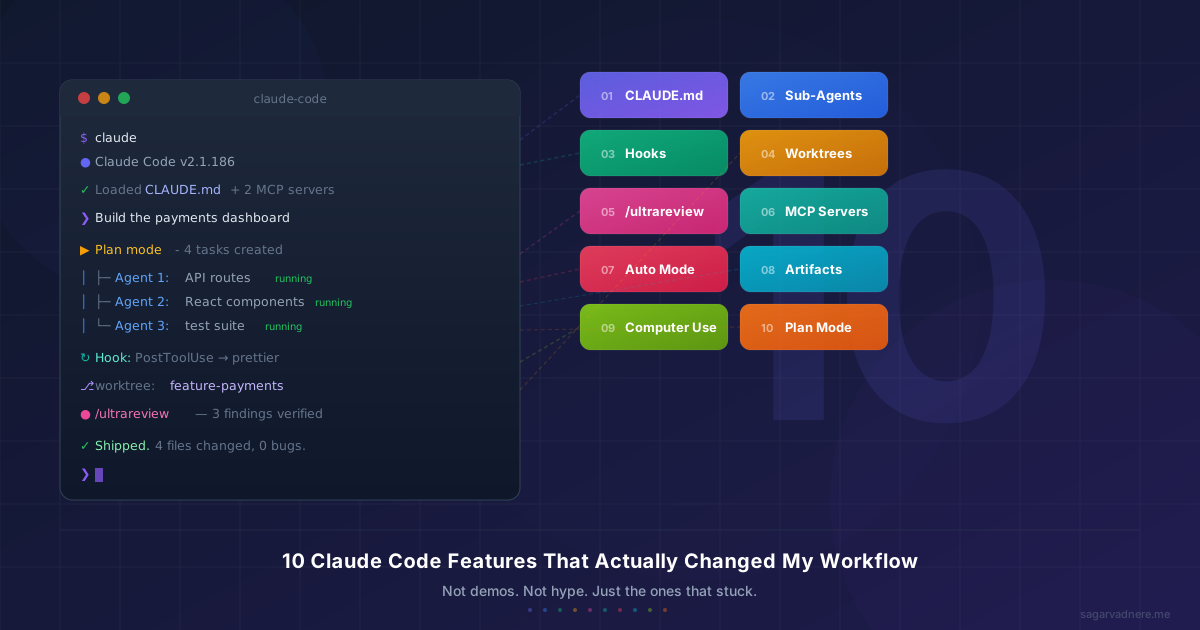
I use Claude Code every single day. Not because I'm supposed to — I genuinely can't imagine going back.
As a Claude Certified Architect, I spend most of my time orchestrating AI agents instead of hand-writing code. I've talked about that workflow before. But here's the thing — the tool itself has evolved dramatically in 2026, and some of these features changed the way I work more than any framework update or library release ever has.
Not all of them, though. Some features are cool demos. Some are genuinely transformative. After months of daily use, I know which is which.
Here are the 10 that actually matter.
1. CLAUDE.md — My Project's Brain
This one is deceptively simple, and it's the foundation everything else builds on.
CLAUDE.md is a markdown file you drop in your project root. Claude reads it at the start of every session and treats it as persistent instructions — your project's conventions, architecture decisions, tech stack, testing preferences, things to avoid. Instead of re-explaining your codebase every time, you write it once and Claude just knows.
What makes it powerful is the hierarchy. You can have:
- A global
~/.claude/CLAUDE.mdfor personal preferences across all projects - A project-level
CLAUDE.mdcommitted to git for the whole team - A local
CLAUDE.local.mdfor your personal overrides (gitignored)
Claude walks up the directory tree and loads all of them. In a monorepo, your root instructions and your package-specific instructions both apply automatically.
Why it changed my workflow: I stopped spending the first five minutes of every session catching Claude up. My CLAUDE.md has our naming conventions, our API patterns, our test framework setup, even things like "never use default exports in this project." The result? First-draft output that actually follows our project's style. One thing to watch: keep it under 200 lines or it gets silently truncated. I learned that the hard way.
2. Sub-Agents — Divide and Conquer
This is where things get serious.
Claude Code can spawn sub-agents — smaller, focused Claude instances that handle delegated tasks independently. And as of June 2026, those sub-agents can spawn their own sub-agents, up to 5 levels deep.
In practice, I use this constantly. When I ask Claude to review a complex PR, it might spin up separate sub-agents to check security, analyze performance, and validate test coverage — all at the same time. When I'm building a feature, it breaks the work into parallel tracks and dispatches agents to handle each one.
There are two modes:
- Foreground — blocks the conversation until the sub-agent finishes. Good for sequential work where order matters.
- Background — runs concurrently while I keep working with the main agent. This is the one that changed my life.
I regularly run 3-4 background agents in parallel — one refactoring a component, one writing tests, one researching a library. For workflows with genuinely independent tasks, parallel execution cuts wall-clock time by 60-80%. That's not marketing — that's my Tuesday.
The catch: Each level of nesting gets its own context window, so token costs compound. Most useful work happens at depth 2-3. Going deeper is possible but rarely worth it.
3. Hooks — Automation That Actually Fires
Here's a scenario every Claude Code user has experienced: you tell Claude "always run Prettier after editing a file." It works for a while. Then it forgets. Then you tell it again.
Hooks fix this permanently.
Hooks are deterministic lifecycle automations — shell commands, HTTP calls, or even sub-agent launches that fire at specific points in Claude's workflow. Not "Claude, please remember to do this." More like "this will happen, period."
My most-used hooks:
- PostToolUse on Edit — auto-runs Prettier and ESLint after every file edit. Zero formatting debates.
- PreToolUse on Read — blocks Claude from reading
.envfiles. Security guardrail I never have to think about. - SessionEnd — logs a summary of what changed to a local changelog.
You configure them in settings.json at three levels — global, project (committed), and local (gitignored). The configuration is straightforward — event type, matcher pattern, and a command to run.
Why it matters: Hooks turned Claude from a tool I had to babysit into one that enforces my project's rules automatically. The difference between "please do X" and "X will always happen" is the difference between hoping and knowing.
4. Git Worktree Isolation — Parallel Without the Pain
Before this feature, running multiple Claude sessions on the same repo was a recipe for disaster. Two agents editing the same file? Merge conflicts from within your own workflow? No thanks.
Worktree isolation solves this cleanly. The --worktree flag (or -w) creates an isolated git worktree — a separate working directory with its own branch — so multiple Claude sessions can work on the same repo without stepping on each other.
# Terminal 1: Working on payments
claude -w feature-payments

# Terminal 2: Fixing an auth bug
claude -w bugfix-auth
Each session gets its own branch, its own files, zero risk of conflicts. When you're done, the changes merge back like any other branch.
My sweet spot: 2-3 parallel sessions. One on a feature, one on a bug fix, maybe one running a research task. Beyond that, review overhead starts to outweigh the parallelism gains. But for those 2-3 streams? It's like having extra hands that don't get in each other's way.
5. /ultrareview — The Bug Hunter Fleet
This one made me rethink code review entirely.
/ultrareview launches a fleet of AI reviewer agents in a remote cloud sandbox to find bugs in your branch. Each agent examines the change from a different angle — logic, edge cases, security, performance, architecture, style, and test coverage. And here's the key part: every finding is independently reproduced and verified before it's reported.
That verification step is everything. I've used plenty of AI code review tools that flag 30 things, and 25 of them are noise. /ultrareview reports fewer findings, but they're almost always real. It can even post findings directly as PR comments.
I run it before every critical merge now. It costs $5-20 per review depending on diff size, and it's worth every cent. Last month it caught a race condition in a payment flow that I completely missed during my own review. That single catch probably saved me a weekend of debugging in production.
The workflow: Write feature → self-review → /ultrareview → address findings → merge with confidence.
6. MCP Servers — Plug In Anything
MCP (Model Context Protocol) is the thing that turned Claude Code from a smart CLI into an extensible platform.
MCP servers are external tools that Claude can discover and call during a conversation — just like built-in tools. There are over 500 public MCP servers as of mid-2026, and you can build your own. Claude connects to them at startup and integrates their capabilities seamlessly.
My daily stack:
- GitHub MCP — manage PRs, issues, and reviews without leaving the conversation
- Playwright MCP — spin up a browser and verify UI changes visually
- Context7 — pull accurate, up-to-date library docs instead of hallucinating APIs
The setup lives in your settings file at project, user, or session scope. Once configured, you don't think about it — Claude just has access to those tools when it needs them.
Why it changed things: Before MCP, Claude was limited to reading files and running shell commands. Now it can interact with my entire development ecosystem. Need to check a Jira ticket? Query a database? Verify a deployment? There's probably an MCP server for it. And if there isn't, the protocol is simple enough to build one in an afternoon.
7. Auto Mode — Trust, but Verify
Auto mode sits between "approve every single action" and the terrifying --dangerously-skip-permissions. It's the middle ground I didn't know I needed.
Here's how it works: two layers of defense run on every action. An input layer scans tool outputs for prompt injection attempts before they enter Claude's context. An output layer evaluates each action through a classifier before execution — safe actions proceed automatically, risky ones get blocked or escalated to you for manual approval.
In practice, this means Claude can read files, search code, run tests, and make edits without me clicking "approve" fifty times per session. But if it tries to delete a branch, push to remote, or run a destructive command, I get a prompt.
The result: Sessions feel 3x faster because I'm not context-switching to approve routine operations. But I still have a safety net for anything that could actually hurt me. It's the permission model that should have existed from day one.
8. Artifacts — Show, Don't Tell
This one is brand new — beta launched June 18, 2026 — and I'm already hooked.
Artifacts turn terminal work into live, interactive web pages hosted at private URLs. Think annotated PR walkthroughs, architecture diagrams, deploy dashboards, release checklists — all generated from your Claude Code session and shareable with your team.
I used to spend 30 minutes writing up a PR description with screenshots and context. Now I say "make an artifact that walks through this PR with the diff annotated inline" and I have a shareable page in seconds. For async code reviews with teammates in different time zones, this is a game-changer.
The practical use: After a complex feature build, I generate an artifact that explains the architecture decisions, shows the key code changes, and highlights what reviewers should focus on. My team reviews faster because they have context, not just a raw diff.
9. Computer Use — When the Terminal Isn't Enough
This one feels like the future.
Computer use lets Claude see and control your desktop — taking screenshots, clicking buttons, typing into fields, scrolling through applications. All from the same CLI session where it wrote the code.
The practical use case that sold me: building a UI component, then having Claude launch the dev server, navigate to the page, interact with the component, and screenshot the result — all in one conversation. No more "I built the component, trust me it looks right." Claude can verify it visually.
It's macOS only right now, and you need to grant Accessibility and Screen Recording permissions. The Esc key is a hard abort from anywhere, which is a nice safety touch. It's still a research preview, but for UI work and end-to-end verification, it's already practical.
10. Plan Mode + Task Management — Think Before You Build
I saved this for last because it ties everything together.
Plan mode forces Claude to describe what it intends to do and wait for your approval before making any changes. Combined with the structured task management system — where tasks persist across sessions with dependencies and blocker tracking — this gives you a proper planning-then-execution workflow.
My process: I enter plan mode, describe the feature at a high level, and Claude breaks it into a structured task list with dependencies mapped out. I review, adjust priorities, approve the plan. Then Claude executes — checking off tasks as it goes, spinning up sub-agents for parallel work, using worktrees for isolation.
Tasks persist in ~/.claude/tasks/ as JSON files. They survive context resets. They can even be shared across sessions, so if I start a feature in the morning and pick it up after lunch, the progress is still there.
Why it matters: This is the difference between Claude as a tool and Claude as a workflow. Plan mode is where my 10 years of architecture experience has the highest leverage — I'm not writing code, I'm shaping the plan that determines whether the code is even worth writing.
The Features That Didn't Make My List
To keep this honest: not everything Claude Code shipped this year changed my life. Some features are impressive engineering that I rarely use in practice. That's fine — different workflows need different tools. This list is specifically what moved the needle for someone who uses Claude Code 6-8 hours a day to build production software.
Here's What It All Adds Up To
These aren't 10 independent features. They're an ecosystem.
CLAUDE.md sets the context. Plan mode and tasks structure the work. Sub-agents and worktrees parallelize execution. Hooks enforce standards. MCP servers extend reach. /ultrareview catches what I miss. Artifacts communicate the result. Auto mode keeps everything flowing without friction.
Six months ago, I was a developer who used AI to write code faster. Now I'm a system architect who orchestrates AI agents across parallel workstreams — and the tooling finally supports that way of working.
If you're still using Claude Code like a fancy autocomplete, you're leaving 80% of its value on the table. Pick one feature from this list. Try it for a week. Then try another. The compound effect is real.
Your workflow will never look the same.
Get in Touch
Want to collaborate or just say hi? Reach out!